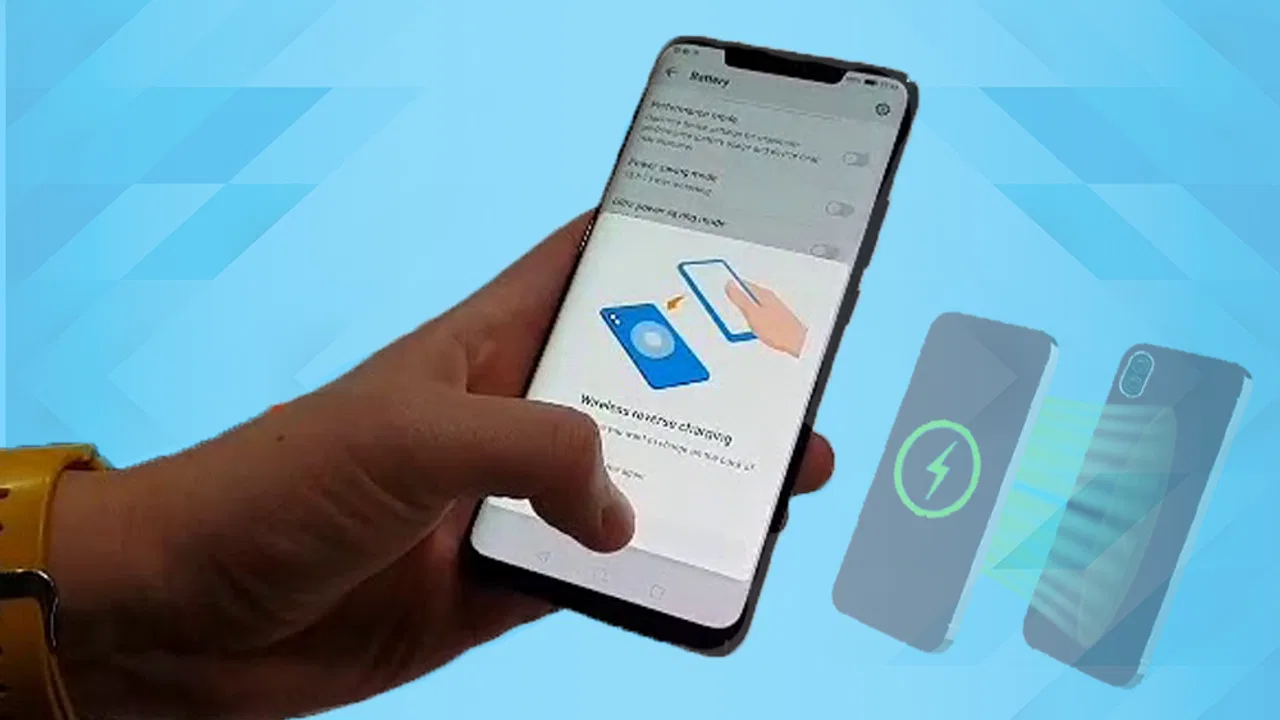
Wireless charge Phone to Phone
- 4.1
- Rating
- 100.00K
- Installs
- Free
- Price

 Analysis by App-foxy
Wireless charge Phone to Phone caught my attention because it tackles a very specific annoyance: having a compatible phone nearby but no cable or power bank available. Masivapp presents it as a Libraries & Demo app built around wireless reverse charging, and I found the idea immediately appealing in the way many practical experiments are appealing. It promises to turn one phone into a possible power source for another, at least when the hardware and software involved support that kind of charging.
My first impression was positive, but also cautious. This is not the same as carrying a dedicated charger, and the app cannot create wireless charging hardware where a phone does not already have it. Its usefulness depends heavily on the devices involved. That distinction matters more than the short store summary suggests, because the application is best understood as a way to access or demonstrate a phone-to-phone charging function, not as a universal replacement for a cable.
The real question is not whether the idea is clever; it is whether I would still keep the app around after the novelty wears off. After using it as a practical tool rather than treating it like a one-time demo, I see a narrow but genuine purpose. It can be worthwhile for people who regularly carry two compatible phones, help family members with low batteries, or want to test whether reverse wireless charging is useful in their routine. For everyone else, the value may fade quickly.
You May Also Like

 Blood Strike: 2.5 Anniversary
Blood Strike’s Loadouts Turn Every Drop Into a Tactical Gamble
A close look at Blood Strike’s custom loadouts: how fast access to signature weapons reshapes its battle royale rhythm, rewards preparation, and narrows the gap between fights.

 Pandora - Music & Podcasts
Pandora’s Music Is Easy to Start, but Harder to Recover
Pandora’s strength is its low-effort path from a seed to a station. Its weak spot is how much confidence it asks you to place in connection, setup, and quiet recovery.

 8 Ball Pool
 Is Built on Rivalries, Rematches, and Routine
A close look at the rivalries, rematches, shared routines, and unanswered safety questions that turn a quick pool match into a persistent mobile community.

 Samsung Music
’s Quiet Strength Is Playing What You Already Own
Its reach comes less from spectacle than from dependable access to a personal library. That simplicity is both the app’s strongest retention engine and its ceiling.

 AccuWeather: Weather Radar
AccuWeather Review: A Quick, Clear Forecast for Everyday Decisions
For everyday plans, the best forecast is the one you can understand quickly. AccuWeather makes rain timing, radar, and local conditions easy to act on, with a few trade-offs.

 Hill Climb Racing
Why Hill Climb Racing Still Turns Crashes Into One More Run
A tiny car, a bumpy hill and one more upgrade: Hill Climb Racing keeps resurfacing because its simple chaos makes every near-miss feel personal.
More From Our News Desk
View All News


From an interesting first week to a more realistic habit
I found that the first week is mostly about discovering whether the idea fits my routine, while a lasting habit depends on having a clear reason to use it. I would make one low-pressure test part of setting up a compatible pair of phones, then decide whether that backup is worth remembering. That practical question leads naturally to how easily different people can read, navigate, and use the app.
Why the first use feels more useful than expected
During the first week, the strongest appeal is the simplicity of the concept. Instead of searching for a spare cable, I can place one compatible phone against another and investigate whether the second device can receive power. That feels especially convenient in a car, at a café, in a waiting room, or at home when the only available charger is already being used.
The app also makes a good demonstration tool. If someone has never tried wireless reverse charging, Wireless charge Phone to Phone gives the idea a clear place to begin. Rather than digging through unrelated system menus, the user has a focused app associated with the task. In that sense, the Libraries & Demo classification makes sense: it is partly a practical utility and partly an accessible way to explore a device capability.
There is an important reality check, though. The receiving phone and the supplying phone must support the necessary wireless charging functions. The app does not turn an ordinary handset into a charging pad by software alone. I would therefore install it only after checking the hardware capabilities of both phones. This is the first useful tip: verify compatibility before treating the app as an emergency charger, especially if the second phone is already close to shutting down.
A realistic everyday scenario
Imagine leaving home with a main phone at a comfortable battery level and an older spare phone that is nearly empty. You are traveling, the spare contains a useful ticket or authentication method, and there is no convenient outlet. If both phones can handle reverse wireless charging, this app may help you start the process without another accessory. The benefit is not speed or convenience on the level of a dedicated charger; the benefit is that it uses equipment already in your hands.
I can also see a family use case. One person may have a newer phone with power to spare while another has forgotten to charge theirs. In that situation, even a short transfer could be enough to keep the weaker phone available for a call or message. The app is more valuable as a backup option than as a daily charging routine.
Placement is another practical detail. Wireless charging requires the devices to stay aligned, and phones can slide apart when placed on a soft surface or carried in a bag. I would use a flat, stable area and remove thick cases if they interfere with contact. That is not a special feature of this particular app, but it is a trade-off that determines whether the experience feels helpful or frustrating.
What changes after the novelty fades
After the first few experiments, the application has to earn its place through repeat usefulness. The novelty of charging one phone from another is real, but novelty alone does not justify keeping an app installed. In my experience, the recurring value depends on whether I often find myself carrying two compatible devices and whether I dislike carrying a cable more than I dislike the slower, less predictable transfer process.
For a person who owns only one phone, the long-term case is weaker. The app may still be interesting for learning about reverse charging, but it is unlikely to become part of a daily routine. A compact cable or small power bank remains more broadly useful because it works with more situations and does not require a second phone to sacrifice its own battery.
For people who manage several devices, the calculation is different. A work phone, personal phone, or spare handset can make the feature available when needed. In that context, the app can function as a small emergency workflow: check the source phone, activate the charging function, align the devices, and leave them undisturbed for a short period. The process is simple enough to remember, but not so effortless that I would use it without a reason.
Month-to-month value for different users
The app is free, which lowers the cost of trying it. It carries an Everyone content rating, and its minimum operating-system requirement is Android 7.0, so it is accessible to a broad range of Android users. Its current version is 10.0, and the project has been available since December 12, 2023. Those details make it easy to test on a suitable device without making a financial commitment.
Its public response also suggests that it has found an audience: it holds a 4.2 average from around 2.5 thousand ratings, with more than 100 thousand installs. I read those figures as evidence of interest rather than proof that it will work equally well on every phone. Reverse charging remains dependent on the hardware, operating-system behavior, phone case, alignment, and battery conditions of the devices being used.
For an Android enthusiast, the month-to-month value may come from experimentation. The app can help compare how different phones behave, reveal whether a particular handset supports the function, and provide a more approachable entry point than searching through technical documentation. That is a concrete use beyond the first demonstration: it becomes a small testing aid when several devices are available.
For a traveler, the value is more occasional. I would not plan an entire trip around it, but I might keep it installed if I frequently carry a second compatible phone. The app can reduce the number of accessories I need in a very specific emergency. The trade-off is that the source phone loses power too, so the transfer is not free. It moves the problem rather than eliminating it.
How it compares with ordinary alternatives
A cable remains the more dependable choice for most charging situations. It normally gives a clearer connection, is easier to position, and can be used with a wall adapter, car adapter, laptop, or power bank. If I am preparing for a long day away from an outlet, I would choose a cable or battery pack before relying on phone-to-phone wireless charging.
A dedicated wireless charging pad is also better for a fixed home or office setup. It is designed to receive power from a stable source, while reverse charging asks one mobile device to supply another. That makes the phone-to-phone approach more flexible in an emergency, but less suitable as a regular charging station.
Wireless charge Phone to Phone has one advantage over both alternatives: it can be available when the only spare power source is another phone. That is a narrow advantage, but a meaningful one. I would recommend it to someone who understands that distinction. I would skip it for anyone looking for a universal charger, faster charging, or a solution that works independently of device compatibility.
The maintenance burden is small, but not zero
The app itself is not the main maintenance concern. The bigger burden is remembering the conditions that make the feature work. I need to keep both phones charged enough to share power, know which device is the source, and avoid assuming that a brief connection means meaningful charging has begun. If the phones move, the transfer may stop or become ineffective.
Cases deserve attention too. A thin case may be harmless, while a thick or unusually shaped case can create too much distance between the charging coils. When testing the app for the first time, I would try it with both cases removed, then add them back one at a time. This simple check prevents a common mistake: blaming the app when the physical alignment is the actual problem.
I would also avoid treating the process as something to leave unattended for a long time. The source phone is being used as a charger, so its own battery level matters. Heat, movement, and battery drain can make the arrangement less attractive than a conventional charger. The best workflow is short and intentional: transfer enough power for the immediate task, then stop.
Another useful habit is to test the setup before an emergency. Trying to discover compatibility when a phone is already at a critical battery level is stressful. A quick test at home lets me learn how the phones need to be positioned and whether the cases interfere. This is one of the app’s less obvious strengths: it encourages users to turn an abstract hardware capability into a known procedure before they actually need it.
Where fatigue starts to appear
The first source of fatigue is uncertainty. With a cable, I usually know what should happen as soon as the connector is inserted. With phone-to-phone wireless charging, I have to consider whether both devices support it, whether the charging surface is aligned, whether a case is blocking it, and whether the source phone has enough energy to make the transfer worthwhile.
The second is the physical arrangement. Two phones need to remain together, and that can be awkward on a small table or while moving around. A cable gives the devices more freedom to sit apart. If I am using the receiving phone while it charges, the wireless arrangement may be less practical than simply connecting a cable.
The third is the emotional mismatch between the promise and the result. The idea sounds like one phone can rescue another instantly, but the source battery still pays the cost. If I need a large amount of power, I may end up with two partially drained phones instead of one charged phone and one full backup. That makes the feature best suited to topping up enough for a specific task, not rebuilding a dead battery.
There is also a risk of installing the app for a single experiment and then forgetting it exists. Because its purpose is so focused, it does not naturally compete with broader utilities that I open every day. I would periodically ask whether I have actually needed it. If I never carry a compatible second phone, removing it would be sensible rather than keeping it purely because the concept is interesting.
Questions I would answer before installing
Can the app make any phone support wireless reverse charging? No. The phone hardware must already provide the necessary capability. The application can guide or expose the charging use case, but software cannot add a missing charging coil or compatible power-management system. This is the most important expectation to set.
Is it a replacement for a power bank? I would say no. A power bank is designed to store energy independently and usually offers a more predictable emergency solution. This app is useful when another suitable phone is already available and sharing its battery is acceptable.
Will it be useful with only one phone? Mostly as a demonstration or compatibility experiment. Its practical value becomes much stronger when the user regularly has access to two compatible devices. A single-phone owner should consider it optional rather than essential.
Does a higher battery level on the source phone guarantee a good transfer? Not necessarily. Battery percentage is only one part of the situation. Alignment, cases, device support, and the amount of power needed all affect whether the process is worthwhile. I would use it for a modest rescue rather than expect a full, effortless recharge.
Who should skip it? Anyone who needs dependable charging for work, travel, navigation, or emergencies should prioritize a cable and power bank. I would also skip it if I disliked monitoring two phones or if my devices were not known to support the required function. The app is not a bad choice in those cases; it is simply aimed at a narrower problem.
My long-term verdict
Masivapp’s app earns a place for a specific kind of Android user: someone with compatible phones, an interest in practical device features, and occasional situations where another charging accessory is unavailable. Its free access and approachable purpose make experimentation easy, while the Everyone rating and Android 7.0 minimum allow many users to try it on older supported devices.
My lasting opinion is positive but measured. I would keep it installed on a secondary phone if I regularly moved between two compatible handsets or helped family members with battery problems. I would not make it my primary charging method, and I would not recommend it as a substitute for a cable or power bank. The app’s recurring value comes from being ready for a narrow emergency, not from transforming everyday charging.
What I like most is that it turns a hidden or overlooked phone capability into something approachable. What I like least is that the experience remains dependent on physical conditions the app cannot control. That balance is why Wireless charge Phone to Phone feels more useful as a prepared backup than as a daily habit.
After the first-week excitement fades, the application survives on practical memory: knowing that two suitable phones can help each other, knowing how to align them, and knowing when the transfer is worth the battery cost. If that situation matches your routine, I think it deserves a trial. If you want certainty, speed, and broad compatibility, your usual charger remains the better long-term companion.
FAQs for Wireless charge Phone to Phone
01How does phone-to-phone wireless charging work?
Phone-to-phone wireless charging, often known as reverse wireless charging, allows one smartphone to charge another by using the first phone’s battery power. This feature relies on the Qi wireless charging standard. Simply enable reverse charging on the device providing power and place the receiving device on its back.
02Which devices are compatible with phone-to-phone wireless charging?
Most modern smartphones with wireless charging capabilities can use phone-to-phone wireless charging. However, both devices must support the Qi wireless standard. Check your phone’s specifications to ensure compatibility, as older models or budget-friendly phones may not support this feature.
03What is the charging speed for phone-to-phone wireless charging?
Phone-to-phone wireless charging typically offers slower charging speeds compared to traditional wired charging. Charging rates can vary depending on the devices and battery levels, but generally, it is best suited for emergency situations where a small power boost is needed rather than a full charge.
04Does phone-to-phone wireless charging consume a lot of battery?
Yes, using phone-to-phone wireless charging can significantly drain the battery of the device providing power. It’s important to use this feature sparingly and be aware of your battery levels to avoid leaving the power source phone without enough charge for itself.
05Are there any risks involved with phone-to-phone wireless charging?
While phone-to-phone wireless charging is generally safe, excessive use can lead to increased heat generation, which may impact battery health over time. Additionally, ensure both devices are placed correctly to avoid inefficient charging or potential overheating. It’s recommended to use this feature when absolutely necessary.
Pros
- Seamless charging without cables.
- Ideal for quick power sharing.
- Supports multiple device brands.
- Eco-friendly with no extra accessories.
- Simple and intuitive user interface.
Cons
- Limited to compatible devices only.
- Drains battery of charging phone.
- Slower charging speed than cables.
- Can overheat during extended use.
- Requires precise alignment for charging.

Wireless charge Phone to Phone
Gallery